This post is also available in 简体中文 and 繁体中文.
Proof of Delivery App: A Complete Guide for Delivery Businesses
If you run a delivery operation, you have probably dealt with this situation before: a customer calls and says they never received their package. Your driver swears it was delivered. There is no evidence either way, and you end up issuing a refund or sending a replacement just to keep the peace.
This is exactly the kind of problem that proof of delivery (POD) solves. In this guide, we will walk through what POD is, why it matters, and how the right app can transform the way your delivery business handles confirmations.
What Is Proof of Delivery?
Proof of delivery is documented evidence that a shipment was successfully delivered to the intended recipient. Traditionally, this meant a signed paper slip that the driver brought back to the warehouse. Today, digital proof of delivery has replaced most paper-based systems with photos, electronic signatures, GPS timestamps, and barcode scans.
A POD record typically includes:
- Who received the delivery (name or signature)
- When it was delivered (date and time)
- Where it was left (GPS coordinates or a photo of the drop-off location)
- What was delivered (item list, barcode confirmation)
This information creates an auditable trail that protects both your business and your customers.
Why Proof of Delivery Matters
Without solid delivery confirmation, your operation is exposed to several risks that directly affect your bottom line.
Delivery Disputes
When a customer claims non-delivery and you have no proof, you lose. Either you refund the order, send a replacement, or damage the relationship. For businesses handling hundreds of deliveries a day, even a small dispute rate adds up fast.
Chargebacks and Financial Loss
In e-commerce and third-party delivery, customers can file chargebacks with their payment provider. Without documented proof that the delivery occurred, you have almost no chance of winning the dispute. Each chargeback costs you the product value plus processing fees.
Accountability Gaps
If a driver says a package was delivered but the customer disagrees, who do you believe? Without proof, there is no way to hold anyone accountable. This creates a culture where mistakes go untracked and repeat offenders stay hidden.
Customer Complaints
Delivery complaints are one of the top reasons customers leave. A customer who has to chase up a missing package -- even if it turns out to have been delivered -- remembers that frustration. Clear delivery confirmation, especially a photo showing exactly where the package was left, eliminates most of these calls before they happen.
Billing Delays
For B2B deliveries and contract logistics, invoicing often depends on confirmed delivery. If your proof process is slow or manual, your billing cycle stretches out. Paper-based POD systems are notorious for creating weeks of delay between delivery and payment.
Types of Proof of Delivery
Modern POD apps offer several methods to capture delivery confirmation. Most businesses use a combination depending on the delivery type.
Photo Proof
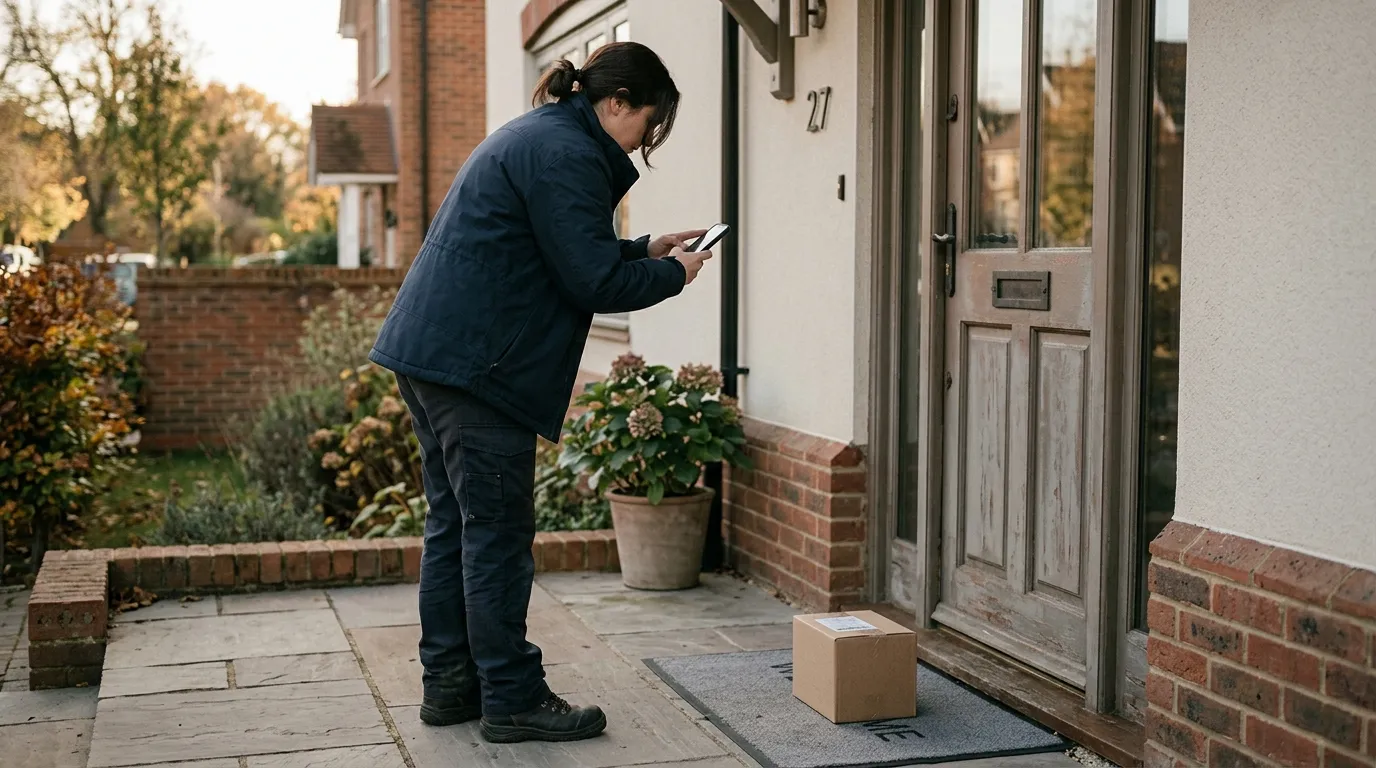
The driver takes a photo of the package at the delivery location. This is the most common method for residential deliveries, especially when the recipient is not home. The photo shows the package placement and surrounding context, making it easy to verify later.
Electronic Signature
The recipient signs on the driver's device screen. This is standard for high-value deliveries, legal documents, and any situation where you need confirmation that a specific person received the item. Signature capture also works well for B2B deliveries where a warehouse staff member signs off on receipt.
Barcode or QR Code Scan
The driver scans a barcode on the package or at the delivery location. This method is popular in logistics operations where accuracy and speed matter more than personal confirmation. Scanning eliminates the risk of delivering to the wrong address or mixing up packages on a multi-stop route.
GPS Timestamp
The app automatically records the GPS coordinates and time when the driver marks a delivery as complete. This runs in the background and provides an additional layer of verification. If a dispute arises, you can show that the driver's device was at the correct address at the recorded time.
Notes and Custom Fields
Some deliveries need additional context. The driver might note that the package was left with a neighbour, placed in a secure location, or that the recipient requested a specific drop-off spot. Custom fields let you capture situation-specific information that a photo alone might not convey.
What to Look For in a Proof of Delivery App
Not every POD solution is built the same. Here is what to evaluate when choosing an app for your delivery team.
Offline Capability
Drivers deliver to areas with poor mobile coverage all the time. Your app needs to capture proof even without an internet connection and sync the data when connectivity returns. If the app requires a constant connection, you will have gaps in your records.
Speed and Simplicity
Drivers are under time pressure on every stop. If capturing proof takes more than 15-20 seconds, they will skip it or rush through it. The best POD apps make the process almost automatic: snap a photo, tap confirm, move on.
Integration with Route Planning
POD works best when it is part of a larger delivery workflow, not a standalone tool. When your route planner and POD system are connected, drivers can navigate to each stop, capture proof, and mark it complete without switching between apps. This keeps the workflow tight and reduces errors.
Real-Time Visibility
Dispatchers and managers need to see delivery confirmations as they happen. Real-time syncing means you can respond to issues immediately rather than waiting for drivers to return to base. If a customer calls about a delivery, you can pull up the proof on the spot.
Customer Notifications
The best systems automatically notify customers when their delivery is confirmed, often including the photo proof. This dramatically reduces inbound "where is my package" calls and builds trust with your customer base.
Data Storage and Access
Proof records need to be searchable and accessible for weeks or months after delivery. When a chargeback comes in 30 days later, you need to find that specific delivery's photo and GPS data quickly. Cloud-based storage with search functionality is essential.
How Digital POD Improves Operations
Switching from paper-based or informal proof systems to a digital POD app has measurable operational benefits.
Reduce Disputes by Up to 90%
When every delivery has a timestamped photo and GPS record, most disputes resolve themselves. The customer can see exactly where the package was placed. There is nothing to argue about when the evidence is clear.
Speed Up Billing Cycles
For B2B and contract delivery operations, digital POD means invoices can go out the same day as delivery. No more waiting for paper slips to come back from the field. Some businesses report cutting their billing cycle from two weeks down to same-day.
Improve Driver Accountability
When drivers know every delivery is documented, performance improves naturally. Missed deliveries, incorrect placements, and sloppy handling decrease because there is a clear record. You can also use POD data to identify training opportunities and reward top performers.
Lower Customer Service Costs
Fewer "where is my package" calls means your support team can focus on issues that actually need human attention. Many delivery businesses report a 40-60% reduction in delivery-related support tickets after implementing photo proof of delivery.
Build Customer Confidence
Customers increasingly expect delivery confirmation. When you proactively send a photo showing their package safely delivered, it signals professionalism and reliability. This is especially valuable for premium and white-glove delivery services.
How iDirect Handles Proof of Delivery
iDirect builds proof of delivery directly into the route planning and delivery workflow, so drivers do not need a separate app or extra steps.
When a driver completes a stop in iDirect, they can capture a delivery photo right from the stop screen. The app automatically tags the photo with GPS coordinates and a timestamp. For stops that require a signature, the recipient can sign directly on the driver's device.
All proof records sync in real time, so dispatchers can see completed deliveries as they happen. If a customer calls with a question, you can pull up the photo, timestamp, and location data in seconds.
Because POD is integrated with route optimisation, drivers follow their planned route and capture proof at each stop without switching tools. This keeps the process fast and consistent across every delivery.
For teams managing high delivery volumes, this integration means less time on admin, fewer disputes, and faster confirmation across every route.
Try iDirect to streamline your proof of delivery process and keep every delivery documented.
Getting Started with Proof of Delivery
If you are still relying on paper slips, customer phone confirmations, or just trusting that deliveries happened, it is time to upgrade. Here is a practical starting point:
- Audit your current process. How many delivery disputes did you handle last month? What did they cost you in refunds, replacements, and time?
- Define your proof requirements. Do you need photo proof for every stop, or just high-value deliveries? Do certain clients require signatures?
- Choose an integrated solution. A standalone POD app creates more friction than it solves. Look for a tool that combines route planning and delivery confirmation in one workflow.
- Train your drivers. The process should take seconds per stop. Run a quick training session so everyone knows the expectation.
- Monitor and improve. Review your POD data weekly. Look for patterns in missed proofs, common dispute locations, and driver performance.
Proof of delivery is not just a nice-to-have feature for modern delivery operations. It is the foundation of accountable, dispute-free delivery management. The right app makes it effortless for your drivers and invaluable for your business.
Get Started with iDirect and bring proof of delivery into your daily delivery workflow.